oafp
OpenAF processor (oafp) is a command-line utility, distributed with OpenAF (since version 20240318), that takes an input, usually a data structure such as json, and transforms it to an equivalent data structure in another format or visualization. The output data can be filtered through JMESPath, jq, SQL or OpenAF’s nLinq and provided transformers can also be applied to it.
The tool comes with its own built-in documentation that can be accessed by executing:
oafp -h
or you can check it here:
| Document |
|---|
| oafp usage documentation |
| oafp filters documentation |
| oafp templates documentation |
| oafp basic examples |
If you have internet access you can also access a library of examples:
oafp -examples
oafp examples=unix::
oafp examples=kubernetes::kubectl
oafp examples=env
You can also check the library of examples in oafp examples.
If you don’t find a suitable example you can also use OAFP ChatGPT.
Concepts
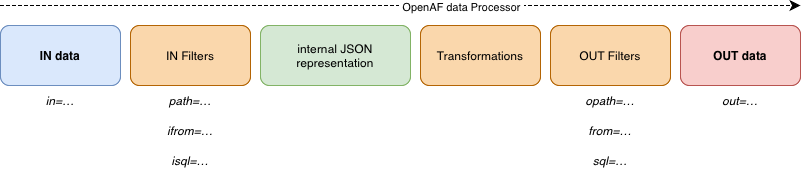
oafp reads input data format, filters that data into an internal JSON representation. Then the internal JSON representation can be transformed and filtered again to an output data format.
Filter order
Every filter is optional, but execution order is fixed independently of command-line argument order:
input → ifrom → isql → path → ijq (alias jq) → transforms → from → sql → opath → ojq → output
| Filter | Query engine | Applied to |
|---|---|---|
ifrom / from |
OpenAF nLinq | Input / transformed output |
isql / sql |
SQL | Input / transformed output |
path / opath |
JMESPath plus OpenAF functions | Input / transformed output |
ijq (or jq) / ojq |
JVM jq 1.6 engine | After the corresponding JMESPath stage |
Do not supply both jq and ijq. A jq expression producing no value suppresses that record; several emissions become one collected array. Streaming behavior and JSON compatibility are described in the filter reference.
oafp in=json data='[{"name":"Ana","active":true},{"name":"Ben","active":false}]' jq='map(select(.active))' ojq='map(.name)' out=json
# ["Ana"]
See the source baseline for the distinction between development oafp, the processor bundled with OpenAF, and the oafproc package.
Decisions and interactive exploration
See decisions and interactive JSON exploration for in=llmdecide, per-entry decision enrichment, and out=idesc with loaded or file-backed JSON. The processor reference provides an overview of the wider pipeline.